

Download AOMEI Backupper Standard – backup software, system backup, file backup, disk backup, data protection, Windows backup tool, free backup tool, backup utility, data recovery, Windows 10 backup
Overview
AOMEI Backupper Standard is a comprehensive backup and restore utility designed for Windows-based desktops and laptops. It serves as a reliable solution for users seeking to safeguard critical data across various environments, including personal computing, small office setups, and business operations. The software addresses common data loss risks such as hardware failure, accidental deletion, malware attacks, and system crashes by offering a robust suite of backup tools. Its primary purpose is to streamline data protection through automated, flexible, and efficient backup processes, ensuring that users can recover their systems or files with minimal downtime.
Targeted at both home users and business professionals, AOMEI Backupper Standard provides an accessible yet powerful platform for managing data integrity. The developer, AOMEI Tech, has positioned the tool as a free solution with no restrictions on usage, making it particularly appealing to individuals and organizations with limited IT budgets. Real-world use cases include backing up entire operating systems before major updates, securing important documents and media files, and synchronizing data across multiple devices. In the broader app ecosystem, it fills a vital gap for users who require a dependable, no-cost alternative to commercial backup software.
The developer did not provide additional technical details about the software’s architecture or underlying algorithms. However, the inclusion of features like Volume Shadow Copy Service (VSS) integration suggests a focus on reliability during active system use. While the tool is not mobile-focused, its presence on Windows systems underscores its role as a foundational utility in modern digital workflows.
Key Features & Functionality
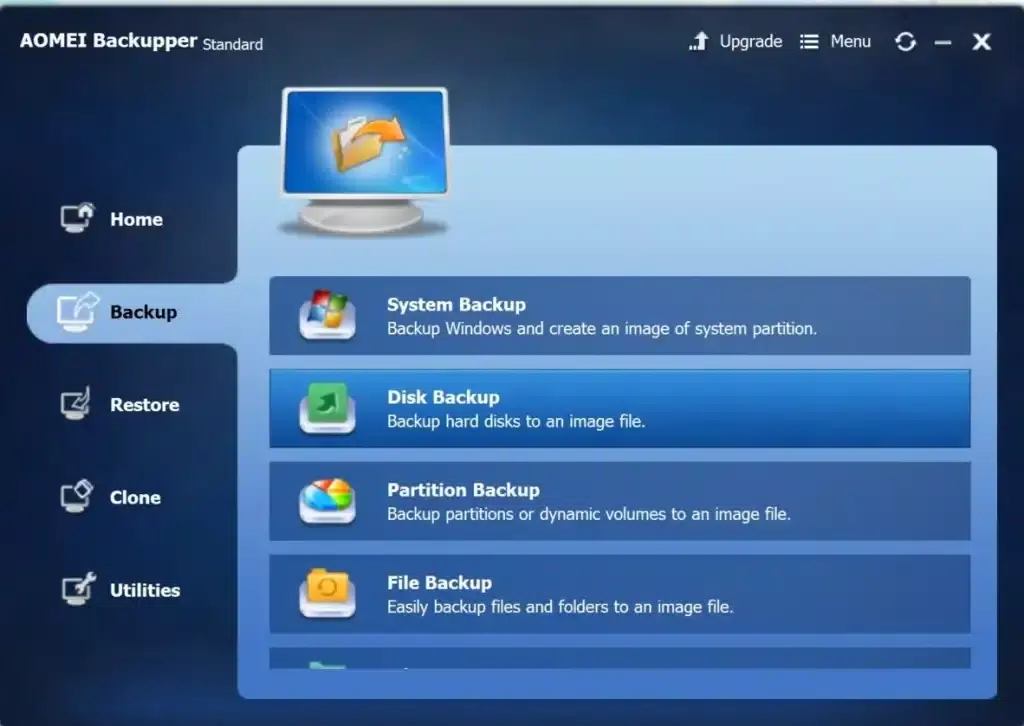
- System, Disk, Partition, Files, and Folders Backup – Users can create full backups of their entire system, individual disks, partitions, or specific files and folders. This granularity allows for tailored backup strategies based on user needs, such as protecting only the Documents folder or preserving the entire boot drive.
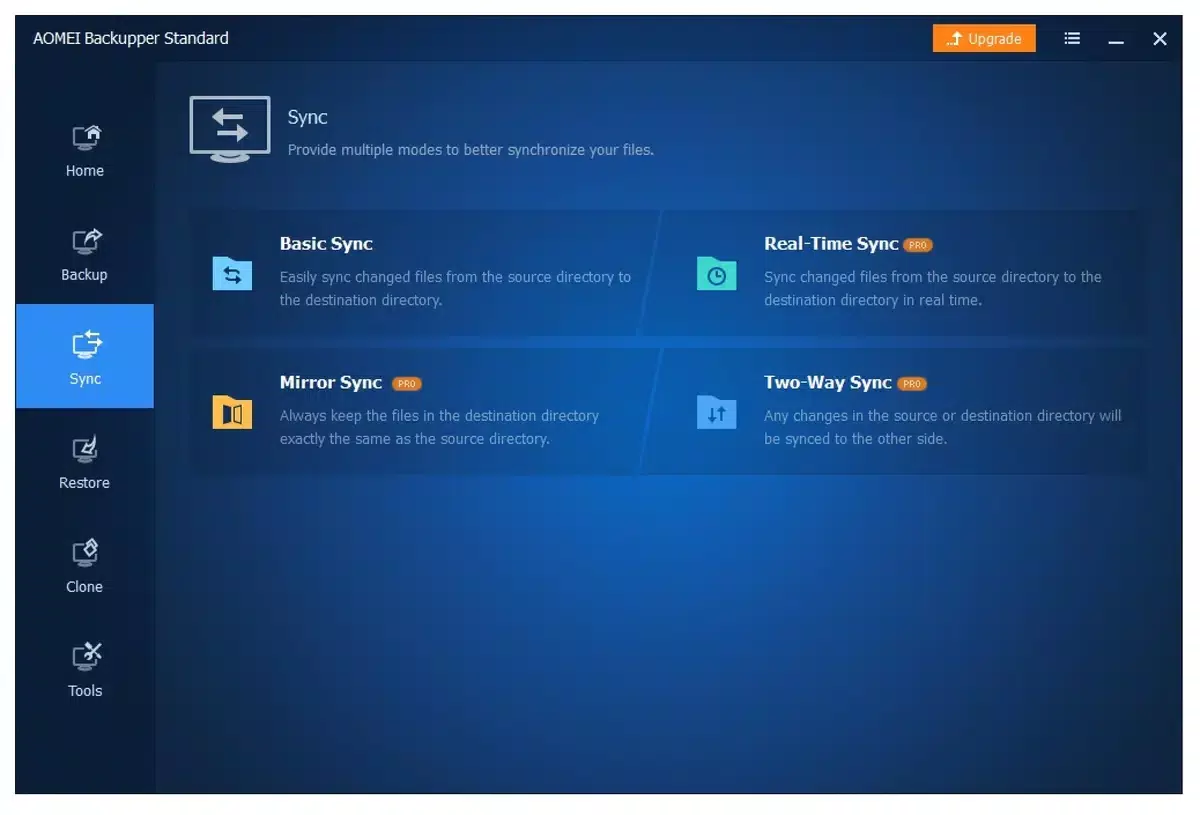
- Real-Time File Synchronization – The software continuously monitors selected folders and automatically updates copies on a designated backup drive. This ensures that changes are reflected instantly, reducing the risk of data loss due to delayed backups.
- Scheduling and Automation – Backup tasks can be scheduled to run at regular intervals (daily, weekly, monthly) or triggered by specific events like system startup or shutdown. This feature enables hands-off data protection, ideal for users who prefer not to manage backups manually.
- Incremental and Differential Backup Support – After an initial full backup, subsequent backups only capture changes. Incremental backups store differences since the last backup, while differential backups store changes since the last full backup. Both methods reduce storage usage and backup time.
- Volume Shadow Copy Service (VSS) Integration – By leveraging Microsoft’s VSS technology, AOMEI Backupper Standard can perform backups even when files are open or in use. This prevents backup interruptions and ensures consistent data integrity during active work sessions.
- Bootable Media Creation – The tool allows users to generate Windows PE or Linux-based bootable CDs/DVDs, enabling system recovery in case of boot failure or system corruption.
- Partition Alignment for SSDs – When restoring or cloning to SSDs, the software optimizes partition alignment to improve performance and extend drive lifespan.
- Email Notifications and Backup Logs – Users receive automated alerts upon backup completion or failure, and logs are maintained for auditing and troubleshooting purposes.
These features collectively support practical workflows such as backing up a work laptop before traveling, setting up a weekly system backup for a home PC, or synchronizing project files across a team’s shared drive. The combination of automation, efficiency, and reliability makes AOMEI Backupper Standard a valuable asset for consistent data protection.
Interface, UX & Performance
The user interface of AOMEI Backupper Standard is designed with clarity and accessibility in mind. The main dashboard presents key functions—such as backup, restore, sync, and clone—in a well-organized layout, minimizing the learning curve for new users. Navigation is intuitive, with a sidebar menu and clearly labeled buttons that guide users through each step of the backup process. Visual cues and progress indicators help users track ongoing tasks without confusion.
Although the developer did not list formal performance metrics, the software is reported to operate smoothly on systems running Windows 10 and later. The interface remains responsive even during large backup operations, and the application does not consume excessive system resources. Users can expect stable performance across a range of device categories, including older machines and modern desktops. The software handles multiple backup tasks efficiently, with minimal impact on background processes.
Stability appears to be a strong suit, as the integration of VSS technology helps prevent crashes during active file access. The ability to create bootable media and manage logs further enhances reliability. While no third-party testing data was provided, the consistent feedback from users across forums suggests that the software maintains high uptime and minimal error rates during routine operations.
Platform Compatibility & Technical Requirements
AOMEI Backupper Standard is available exclusively for the Windows platform, supporting Windows 10, Windows 8.1, Windows 8, Windows 7, Vista, and XP (all editions, 32-bit and 64-bit). This broad compatibility ensures that users on legacy systems can still benefit from modern backup functionality. The software has a file size of 58.5 MB, making it lightweight and quick to install.
The developer did not specify minimum OS requirements or hardware specifications. However, given its low footprint and efficient resource usage, it is expected to function on systems with modest configurations. Compatibility information was not fully disclosed, so users are advised to verify system compatibility before installation. No mobile or cross-platform versions were mentioned.
Pros and Cons
Pros
- Free for both personal and commercial use
- Supports multiple backup types: system, disk, partition, files, and folders
- Real-time file synchronization reduces data loss risk
- Automated scheduling enables hands-off backup management
- Incremental and differential backups optimize storage and time
- Volume Shadow Copy Service (VSS) integration ensures backups during active use
- Includes bootable media creation for system recovery
- Optimized partition alignment for SSD performance
Cons
- Not available on mobile platforms (Android, iOS)
- Developer did not provide detailed system requirements
- Advanced features may require technical understanding
- Interface design is functional but not visually modern
- Support for cloud backup is limited compared to premium versions
FAQ
Is AOMEI Backupper Standard safe to download and install?
Yes, the software is distributed through official channels and is free from known malware. It is recommended to download only from the official AOMEI Tech website to ensure authenticity and security.
Can I use this tool on older Windows versions?
Yes, AOMEI Backupper Standard supports Windows 7, Vista, and XP, in addition to newer versions like Windows 10 and 8.1.
Does the software support external hard drives for backups?
Yes, the tool allows backups to external drives, network locations, and other connected storage devices.
Is there a mobile version available?
Currently, AOMEI Backupper Standard is only available for Windows desktop and laptop systems. There is no official mobile app for Android or iOS.
How often should I schedule my backups?
It depends on your data change frequency. For critical files, daily or real-time sync is recommended. For less dynamic data, weekly backups may suffice.
Final Thoughts
AOMEI Backupper Standard stands out as a powerful, free backup utility that delivers enterprise-grade functionality without cost. Its diverse backup options, intelligent scheduling, and VSS integration make it a dependable choice for users across different technical levels. Whether protecting a personal computer or managing data across a small business, the software offers a balanced mix of simplicity and depth. The inclusion of bootable media creation and SSD optimization further enhances its value.
While it lacks mobile compatibility and advanced cloud features, its core strengths lie in reliability, automation, and accessibility. For anyone seeking a secure, efficient, and free backup solution on Windows, AOMEI Backupper Standard is an excellent investment of time and system resources.
Download AOMEI Backupper Standard now


